
Front Page › Forums › AUDIO & TECHZONE › Tutorials › Tutorial for setting up a keyboard in Reason
-
AuthorPosts
-
May 12, 2007 at 10:11 pm #540513
coojuiceParticipantI like many others had bother setting up my keyboard to work in Reason 3 so I thought i’d post this little tutorial to help out.
For this tutorial I have connected my M-Audio Oxygen V2 Midi Keyboard to my computer.
Once you have your Midi Keyboard connected to your computer open up Reason 3.
Once open select "Edit" then "Preferences" from the options at the top of the screen.
One in the preferences menu, select "Control Surfaces and Keyboards"
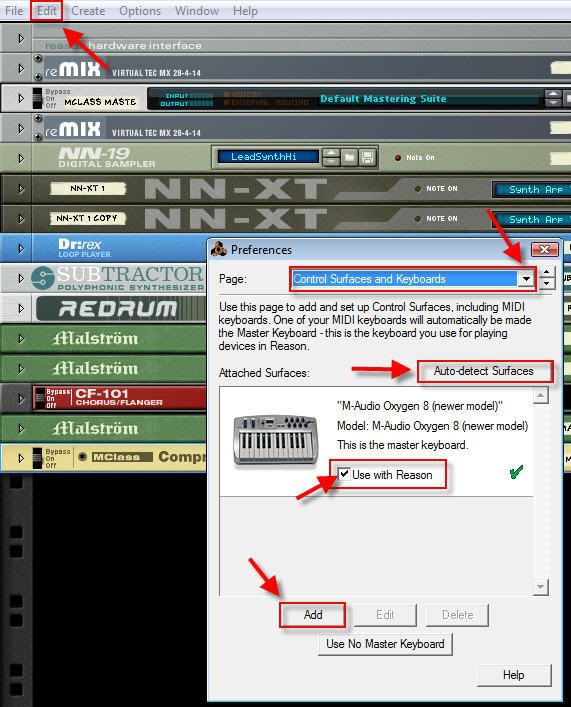
Click on the "Auto-detect Surfaces" button to detect the midi device you have connected to your computer.
Once your device shows up tick the "Use with Reason" box for this device.
*If your device cannot be found click on the "Add" button to manually add your device*
Whilst still in the preferences menu select "Advanced MIDI"
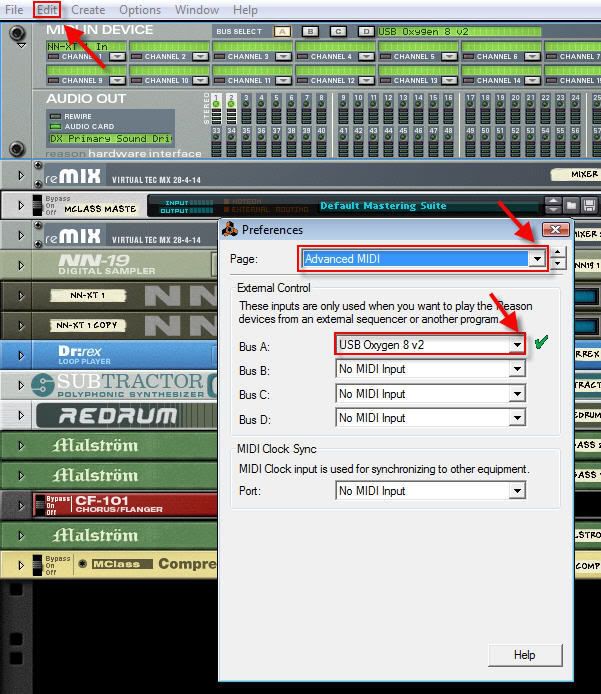
In the "Bus A" box select your device.
Once you have done this, close the preferences box.
In the hardware interface you should now see your device when the "Bus A" button is highlighted.
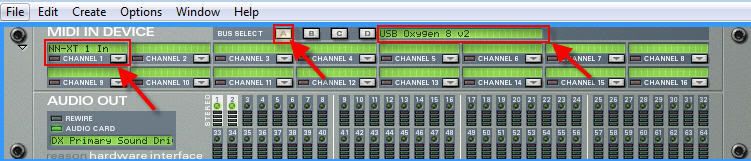
In the "Channel 1" box select what you would like to use the keyboard with. For this tutorial I have selected the NN-XT Digital sampler.
That’s it folks you should now be able to use your keyboard!
If anyone would like to make further comments or note’s on it please feel free to do so.
AdSense 336x280May 12, 2007 at 10:11 pm #621284
coojuiceParticipantI like many others had bother setting up my keyboard to work in Reason 3 so I thought i’d post this little tutorial to help out.
For this tutorial I have connected my M-Audio Oxygen V2 Midi Keyboard to my computer.
Once you have your Midi Keyboard connected to your computer open up Reason 3.
Once open select "Edit" then "Preferences" from the options at the top of the screen.
One in the preferences menu, select "Control Surfaces and Keyboards"
Click on the "Auto-detect Surfaces" button to detect the midi device you have connected to your computer.
Once your device shows up tick the "Use with Reason" box for this device.
*If your device cannot be found click on the "Add" button to manually add your device*
Whilst still in the preferences menu select "Advanced MIDI"
In the "Bus A" box select your device.
Once you have done this, close the preferences box.
In the hardware interface you should now see your device when the "Bus A" button is highlighted.
In the "Channel 1" box select what you would like to use the keyboard with. For this tutorial I have selected the NN-XT Digital sampler.
That’s it folks you should now be able to use your keyboard!
If anyone would like to make further comments or note’s on it please feel free to do so.
AdSense 336x280May 12, 2007 at 10:43 pm #621289
r0ughParticipantthx allot, needed a tut for this !! >.<
AdSense 336x280May 12, 2007 at 11:07 pm #621290
ivan_iamParticipantNice!
AdSense 336x280May 24, 2007 at 6:59 pm #622669
clipse15Participant^ what he said
AdSense 336x280June 1, 2007 at 12:30 am #623558
dawsParticipantthx man. is there away to do this without a midi keyboard? eg. ejay hip-hop 6 style synths? (step sequencer gui)
AdSense 336x280June 3, 2007 at 8:44 pm #623869
ottoorionParticipantthx, very usefull…
AdSense 336x280June 4, 2007 at 10:47 am #623960
coojuiceParticipantdaws wrote:thx man. is there away to do this without a midi keyboard? eg. ejay hip-hop 6 style synths? (step sequencer gui)What do you mean by this? Are you meaning using another midi input other than a keyboard?
If so I think it’s the same idea but you would have to double check that with someone.
AdSense 336x280June 14, 2007 at 11:13 am #625307
VinoParticipantnice
AdSense 336x280June 18, 2007 at 8:19 am #625805
xabitonParticipantwhy go into the advanced midi section for using a midi controller in Reason. Its not needed infact the advanced midi portion of the program is used when using hardware sequencers for example a mpc to sequence Reason. You cannot sequence hardware with Reason however you can sequence Reason on hardware which is what the advanced midi tab is all about.
AdSense 336x280June 19, 2007 at 5:53 pm #626047
coojuiceParticipantxabiton wrote:why go into the advanced midi section for using a midi controller in Reason. Its not needed infact the advanced midi portion of the program is used when using hardware sequencers for example a mpc to sequence Reason. You cannot sequence hardware with Reason however you can sequence Reason on hardware which is what the advanced midi tab is all about.I’ve no idea what that means m8!
I only put up this tutorial to explain how I set up my keyboard in Reason 3 so that anyone else who had the same trouble could use it as a guide.
AdSense 336x280June 27, 2007 at 1:48 am #627165
butters722ParticipantSo thats how it works. Haha now i only have to scrounge up enough minimum wage to be able to afford a keyboard. For now. The mouse is my only friend.
AdSense 336x280December 24, 2008 at 8:36 pm #661295
p.illaParticipantAyo Reason is a great program especially when you’re using a midi controller. Anyone knows how to re-wire Reason to Ableton?
AdSense 336x280April 8, 2009 at 7:11 pm #666420
rlk8481Participant[size size=200:3biel42d]Nice post bro…..Check out my tracks at http://www.myspace.com/mindstatebeats[/size:3biel42d]
AdSense 336x280April 24, 2009 at 11:24 am #666845
foxerParticipantAudition
AdSense 336x280December 20, 2009 at 12:16 pm #675358
DarkJinxDParticipantthanks a lot
AdSense 336x280December 29, 2009 at 3:16 pm #675576
mogrizzlyParticipantI u want more Reason Tips visit http://www.youtube.com/malik493
AdSense 336x280January 26, 2010 at 2:03 pm #676679
voltz115ParticipantI’ve managed this now, thank you! What are the advantages of ASIO4All over DX Drivers? Trying to get my head around lag time…
AdSense 336x280February 16, 2010 at 1:44 pm #677276
doraemonParticipantthanks
AdSense 336x280December 12, 2010 at 8:22 am #684194
themachineragesParticipantthanks so much! i was trying to do this so i checked here and found this topic
AdSense 336x280April 12, 2011 at 5:07 am #686704
purplesuitcolinParticipantexcellent tutorial! really helped me out with my axiom 25
AdSense 336x280April 28, 2011 at 5:30 pm #686975
LordbidParticipantreason sucks
AdSense 336x280June 3, 2011 at 5:31 pm #687461
SaintPaulixParticipantGreat post! I love reason. I’ve been using it for 2 years….
AdSense 336x280January 6, 2014 at 4:50 pm #701549
mic_cimParticipantawesome
AdSense 336x280June 15, 2014 at 2:52 am #702836
jow2009ParticipantCheers, this was causing me a headache!
AdSense 336x280 -
AuthorPosts
The forum ‘Tutorials’ is closed to new topics and replies.
